Website Implementation
This project is a proposed intranet site for a hypothetical company to improve user communication and enhance project administration.
The system uses session variables
- to check which user has logged in
- to include connection variables from the database
- to interpret the user's login details
	$_SESSION['usr'] = $row['email'];

	$_SESSION['pw'] = $row['pw'];

	$_SESSION['dept'] = $row['dep_name'];

	$_SESSION['login']
Login procedure
- login details are passed to the login.php page which checks if user is registered with the following script:
SELECT *

FROM  staff

WHERE email = '".$_POST['frm_usr']."' AND pw = '".$_POST['frm_pw']."'");
- If the login details exist in the database the session variables are reset to corresponding values. Session variable 'login' is set to true. This will make visible the content throughout the site.
- If the login details do not exist in the database the interface outputs the message: 'You have not been found in the system. Please speak with System Administrator'.
Customization: the Menu Bar
- On login greeting, fname, lname and email are fetched from the tables person and staff where email for person and staff match.
- We also match the user's department with the session department. From this link the user will only access staff within his/her department.
- The left menu displays a different colour for each department A switch statement is used to vary the left menu background colour for each department
- The system also queries the database for staff data pertaining to the particular user. If the user exists within the database, the system queries the tables proj_assignment and project and displays projects assigned to the user in the left menu.
- Each project is linked so that when clicked it will output details of each project assigned to the user in the main window as well as a linked list of downloadable associated files.
Member Details
- General users have access to a limited database of information about other users.
- Administration have access to more information.
- This is achieved in the staffadditional.php file with the query:
if(mysql_num_rows($result)>0){

 while ($row = mysql_fetch_assoc($result)) {

   $bool = ($row["first_aid"] == true) ?  "Yes" : "No";

   echo "<tr><td><i>First Aider:</i></td><td>".$bool."</td></tr>";

   echo "<tr><td><i>Innovation Center Member:</i></td><td>".$row["innov_area"]."</td></tr>";

   echo "<tr><td><i>Mentor (Subject Area):</i></td><td>".$row["mentor"] ."</td></tr>";

   echo "<tr><td><i>Completed Training Courses:</i></td><td>".$row["training"]."</td></tr>";

   echo "<tr><td><i>Sport Subscription:</i></td><td>".$row["sport"] ."</td></tr>";

 }

}
'Other Staff' Page
- The 'other staff' link at the bottom of the page links to the staff.php file which opens in a separate window.
- When clicked this window displays a list of staff in alphabetic order. This is done with the sql query:
SELECT DISTINCT lname FROM person p, staff s

                      WHERE p.email = s.email

                      ORDER by lname");
- The lastname first letter is caught using an array for each row in the staff/person tables and linked with a href to the particular letter. Letters are then displayed for each corresponding letter present in the array.
- Name, Company, Phone-ext and Email are then displayed in alphabetical order using the query:
("SELECT DIST. greeting, fname, lname, co_tel, co_ext, p.email

  FROM person p, staff s

  WHERE p.email = s.email

  ORDER by lname");
- The alternative page can be displayed by clicking 'order by position'. This is achieved with the sql query:
("SELECT DISTINCT lname, job_title

  FROM person p, staff s

  WHERE p.email = s.email

  ORDER by job_title");
Department Files
- The downloadable Department Files are fetched from the database using an sql query which combines a url and filename to specify the path and the actual file.
- The file is then loaded into a blank window when the link is clicked.
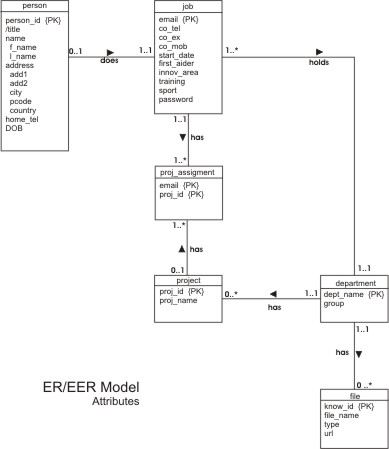
The database consists of eight tables:
- department
- file
- person
- proj_allocation
- proj_assignment
- project
- staff

External Files:
The site was implemented to facilitate re-use of code. As the code was needed on most of the pages it made sense to put the code in one place and to re-use it. This avoided repetition of code as much as possible throughout the site.main.css
External CSS file to format all textual information and to position elements within the page.connUI1.php
External PHP file contains connection details.